Note
This property offers a different localization strategy to the Localizable property of the Windows Forms designer, and it is not recommended to use them both together.

[DefaultValueAttribute(DynamicStringLocalization.Disabled)]
public DynamicStringLocalization DynamicStringLocalization { get; set; }<DefaultValueAttribute(DynamicStringLocalization.Disabled)>
Public Property DynamicStringLocalization As DynamicStringLocalization
Get
Setpublic:
[DefaultValueAttribute(DynamicStringLocalization::Disabled)]
property DynamicStringLocalization DynamicStringLocalization {
DynamicStringLocalization get ();
void set (DynamicStringLocalization value);
}[<DefaultValueAttribute(DynamicStringLocalization.Disabled)>]
member DynamicStringLocalization : DynamicStringLocalization with get, setUnlike the Localizable property of the Windows Forms designer, this property affects the localization of the string properties only, and basically determines the behavior of the default ApplyStringResources implementation. You still can apply non-string resources without enabling Localizable by overriding the ApplyResources method, whose default implementation just calls ApplyStringResources.
When this property is set to Disabled, no automatic localization occurs. To localize string resources programmatically, you can override the ApplyStringResources method.
The ApplyResources method is called automatically when the form is loaded for the first time, but you can explicitly call it whenever you need to re-apply the resources (or ApplyStringResources to re-apply the string resources only), for example when the display language changes.
When the value of this property is not Disabled, then the base ApplyStringResources implementation calls the LocalizationHelper.ApplyStringResources method, which traverses the controls of the form recursively, and invokes the LocalizationRequested event for each localizable string property of the controls. If this property is set to Custom, then you must handle the event to provide localization for the controls programmatically. When the LocalizationRequested event does not handle a request, using LocalScope or AssemblyScope allow using .resx files placed in the Resources folder of the deployment directory that can be automatically generated for the first time when a localization request is made for a culture that has no resource file yet.
Using LocalScope or AssemblyScope works only if the invariant resource set exists for the form or user control.
Only the properties that have an entry in the invariant resource set will be localized automatically.
See also the DynamicStringLocalization enumeration for details.
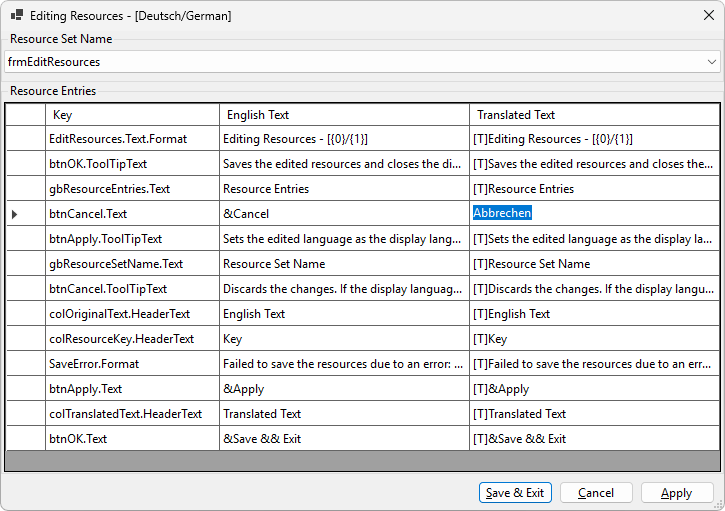
The following image shows a form of an application that allows localizing its resources to any language, and applying them at run-time: