Tip
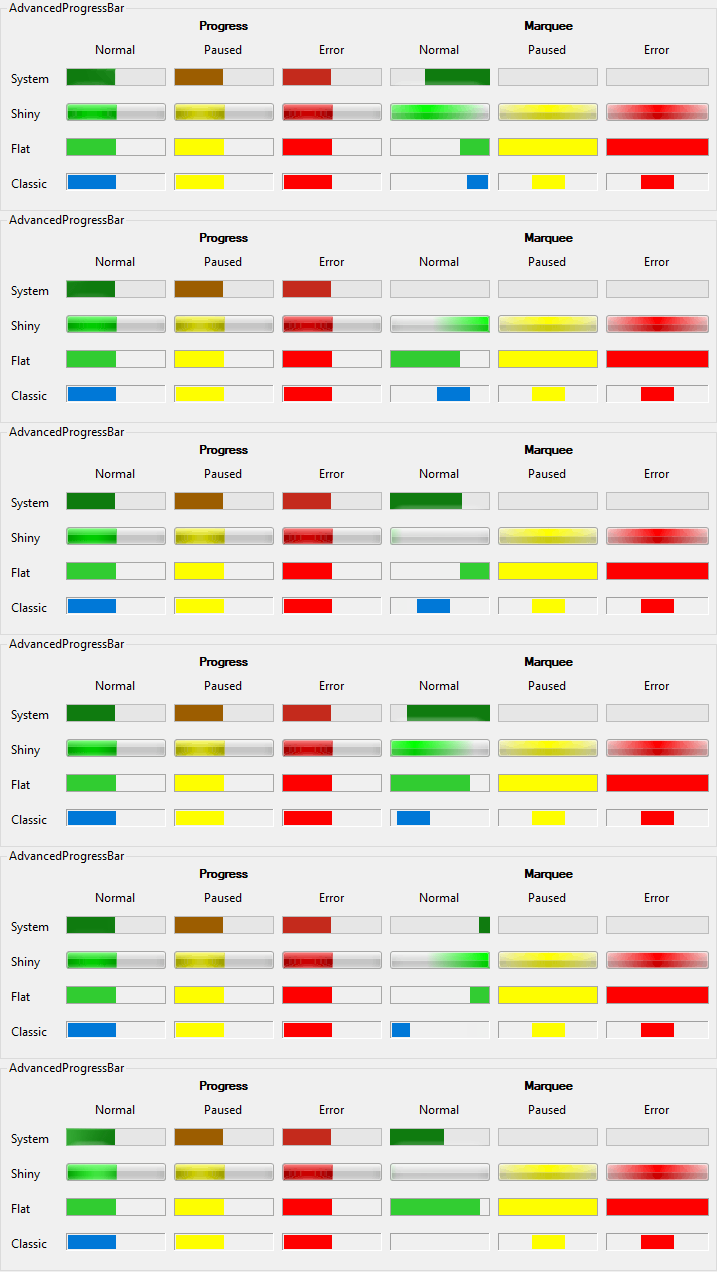
The image above is from the example application.
At the Releases page of the project repository you can download it as executable binaries as well.

[ToolboxBitmapAttribute(typeof(ProgressBar))]
public class AdvancedProgressBar : ProgressBar<ToolboxBitmapAttribute(GetType(ProgressBar))>
Public Class AdvancedProgressBar
Inherits ProgressBar[ToolboxBitmapAttribute(typeof(ProgressBar))]
public ref class AdvancedProgressBar : public ProgressBar[<ToolboxBitmapAttribute(typeof(ProgressBar))>]
type AdvancedProgressBar =
class
inherit ProgressBar
endThe following image illustrates a few features of the AdvancedProgressBar class, like the various Styles, and the stopped/paused States which are not supported by a regular ProgressBar (as of .NET 10.0). The System style reflects the Windows 11 appearance:
| AdvancedProgressBar | Creates a new instance of AdvancedProgressBar. |
| CreateParams | Gets the required creation parameters when the control handle is created. (Overrides ProgressBarCreateParams) |
| ErrorStateColor |
Gets or sets the fore color of the error State.
Applicable only when Style is not System.
Default value: Red. |
| ForeColor |
Gets or sets the foreground color of the control. Has effect when Style is not System,
or when visual styles are not enabled.
Default value: depends on Style. (Overrides ControlForeColor) |
| IsMarquee |
Gets or sets whether the progress bar should operate in marquee mode.
Default value: . |
| MarqueeAnimationSpeed |
Gets or sets the interval in milliseconds between two frames of the marquee animation.
Default value: 100. |
| PausedStateColor |
Gets or sets the fore color of the paused State.
Applicable only when Style is not System.
Default value: Yellow. |
| State |
Gets or sets the state of the progress bar. On pre-Vista Windows versions, or when Application.EnableVisualStyles
was not called in the executing application, applicable only for non-System Styles.
The progress bar stops animating when state is not Normal.
Default value: Normal. |
| Style |
Gets or sets the rendering style of the AdvancedProgressBar.
When visual styles are not available, ThemedShiny and ThemedFlat styles
are defaulting to Classic style.
Default value: System. |
| Value |
Gets or sets the current position of the progress bar.
Default value: 0. |
| Dispose | Releases the unmanaged resources used by the Control and its child controls and optionally releases the managed resources. (Overrides ControlDispose(Boolean)) |
| OnHandleCreated | Raises the HandleCreated event. (Overrides ProgressBarOnHandleCreated(EventArgs)) |
| OnPaint | Raises the Paint event. (Overrides ControlOnPaint(PaintEventArgs)) |
| OnPaintBackground | Paints the background of the control. (Overrides ControlOnPaintBackground(PaintEventArgs)) |
| OnSizeChanged | Raises the SizeChanged event. (Overrides ControlOnSizeChanged(EventArgs)) |
| WndProc | Processes Windows messages. (Overrides ControlWndProc(Message)) |
| GetFormatFlags |
Gets the formatting flags for the text of a custom drawn control.
(Defined by ControlExtensions) |
| GetScale |
Gets the current scale factor of the specified control. If per-monitor DPI awareness is not enabled, it always returns SystemScale.
(Defined by ScaleHelper) |
| GetScrollBarSize |
Gets the recommended width and height of scrollbars matching the current scaling of the specified control.
(Defined by ScaleHelper) |
| HasDefaultScaling |
Gets whether the display that the specified control belongs to has the same DPI as the initial DPI of the primary display.
(Defined by ScaleHelper) |
| ScaleHeight |
Scales the specified height by the vertical scale factor of the control.
(Defined by ScaleHelper) |
| ScaleSize |
Scales the specified size by the scale factor of the control.
(Defined by ScaleHelper) |
| ScaleWidth |
Scales the specified width by the horizontal scale factor of the control.
(Defined by ScaleHelper) |
| SetControlEnabled |
Sets the Enabled property of the child controls within the specified root control,
or the Enabled property of the specified control itself, if it is not a recognized container control.
By this way pages of a TabControl will remain selectable, a SplitContainer remains resizable, etc.
(Defined by ControlExtensions) |
| SetControlReadonly |
Recursively sets the read-only state in the children of the specified root control.
Affects TextBoxBase and IReadOnlyCapable instances.
(Defined by ControlExtensions) |
| SetDoubleBuffered |
Sets the double buffered state of a control
(Defined by ControlExtensions) |
| SetStyle |
Sets a specified ControlStyles flag to either or .
It calls the protected Control.SetStyle method on the specified control as if it was a public method.
(Defined by ControlExtensions) |