Tip
See also the example application that contains
an example for some features of the ImageViewer control.

[ToolboxBitmapAttribute(typeof(PictureBox))]
public class ImageViewer : BaseControl<ToolboxBitmapAttribute(GetType(PictureBox))>
Public Class ImageViewer
Inherits BaseControl[ToolboxBitmapAttribute(typeof(PictureBox))]
public ref class ImageViewer : public BaseControl[<ToolboxBitmapAttribute(typeof(PictureBox))>]
type ImageViewer =
class
inherit BaseControl
endThe ImageViewer control supports both Bitmap and Metafile instances, supporting every PixelFormat, including the ones that are not supported by the PictureBox control or the GDI+ renderer. It supports Wine and Mono runtimes as well.
The control can use optimizations for very fast rendering even if the image is zoomed. It can use multiple CPU cores to generate the displayed image. The generation happens asynchronously, so the control may display a low-quality preview image while the high-quality one is being generated. Very huge images may consume much memory, but if too high memory pressure is detected, the optimizations are automatically turned off.
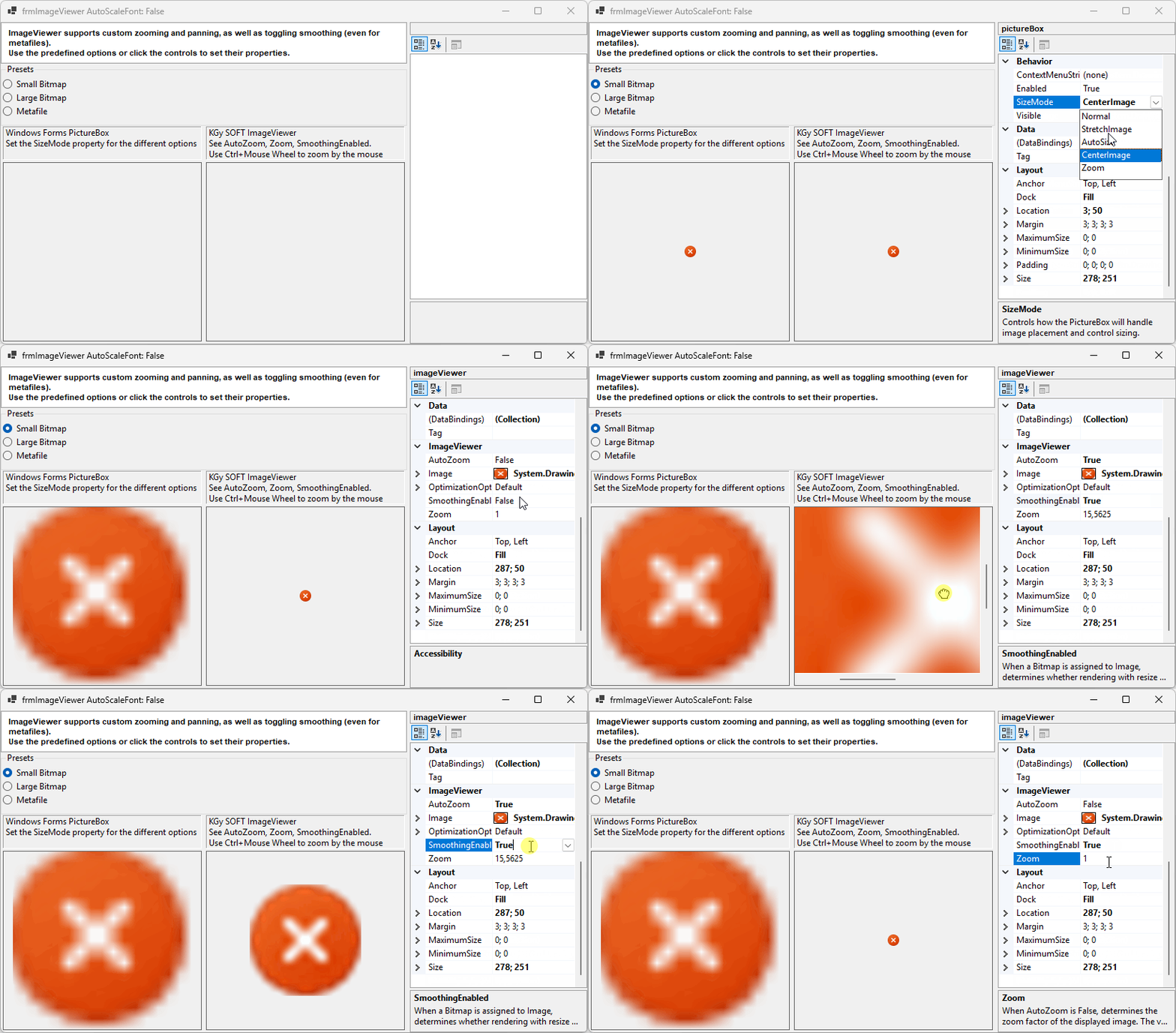
The SmoothingEnabled property allows turning on and off interpolation when zooming. It can be used also for Metafile images, in which case the metafile is rendered with antialiasing. As a contrast, the PictureBox control always uses interpolation when displaying a resized Bitmap, and never uses antialiasing when displaying a Metafile image.
The Zoom property allows you to set an arbitrary zoom. The zoom can also be adjusted by the mouse (Ctrl+Mouse wheel). When the displayed image is larger than the control, the scrollbars are automatically shown. Pan the image by dragging it with the mouse or by using the arrow keys. You can also use the AutoZoom property to to automatically adjust the zoom to fit the image to the control.
The following image illustrates a few features of the ImageViewer class, like panning and zooming by the mouse, and setting SmoothingEnabled, AutoZoom and Zoom properties explicitly:
| ImageViewer | Creates a new instance of the ImageViewer class. |
| AutoZoom |
Gets or sets whether the control automatically adjusts the zoom to fit the image to the control.
It is automatically set to when Zoom is set (either programatically or by the user, using the mouse).
Default value: . |
| CreateParams | Gets the required creation parameters when the control handle is created. (Overrides ControlCreateParams) |
| DefaultSize | Gets the default size of the control. (Overrides ControlDefaultSize) |
| Image | Gets or sets the image to be displayed by the ImageViewer. |
| IsDesignMode |
Gets whether the control is in design mode. Unlike the DesignMode property,
this property works even during initialization.
(Inherited from BaseControl) |
| OptimizationOptions |
Gets or sets optimization options for the ImageViewer control that affect the rendering performance and memory usage.
Default value: Default. |
| SmoothingEnabled |
When a Bitmap is assigned to Image, gets or sets whether rendering with resize uses interpolation (that is when Zoom is not 1).
When a Metafile is assigned to Image, gets or sets whether the metafile is rendered with antialiasing. Smoothing metafiles might be turned off automatically on higher zooming levels. Default value: . |
| Zoom |
Gets or sets the zoom factor of the displayed image.
Default value: 1. |
| DecreaseZoom | Decreases the Zoom by 25%, and turns off AutoZoom if it was enabled. |
| Dispose | Releases the unmanaged resources used by the Control and its child controls and optionally releases the managed resources. (Overrides BaseControlDispose(Boolean)) |
| IncreaseZoom | Increases the Zoom by 25%, and turns off AutoZoom if it was enabled. |
| InvokeOnUIThread |
Invokes the specified callback on the thread that the control was created on.
(Inherited from BaseControl) |
| OnAutoZoomChanged | Raises the AutoZoomChanged event. |
| OnHandleCreated | Raises the HandleCreated event. (Overrides ControlOnHandleCreated(EventArgs)) |
| OnMouseDown | Raises the MouseDown event. (Overrides ControlOnMouseDown(MouseEventArgs)) |
| OnMouseHWheel |
Raises the MouseHWheel event.
(Overrides BaseControlOnMouseHWheel(HandledMouseEventArgs)) |
| OnMouseMove | Raises the MouseMove event. (Overrides ControlOnMouseMove(MouseEventArgs)) |
| OnMouseUp | Raises the MouseUp event. (Overrides ControlOnMouseUp(MouseEventArgs)) |
| OnMouseWheel | Raises the MouseWheel event. (Overrides ControlOnMouseWheel(MouseEventArgs)) |
| OnPaint | Raises the Paint event. (Overrides ControlOnPaint(PaintEventArgs)) |
| OnParentChanged | Raises the ParentChanged event. (Overrides ControlOnParentChanged(EventArgs)) |
| OnRightToLeftChanged | Raises the RightToLeftChanged event. (Overrides ControlOnRightToLeftChanged(EventArgs)) |
| OnSizeChanged | Raises the SizeChanged event. (Overrides ControlOnSizeChanged(EventArgs)) |
| OnZoomChanged | Raises the ZoomChanged event. |
| ProcessCmdKey | Processes a command key. (Overrides ControlProcessCmdKey(Message, Keys)) |
| ResetZoom | Resets the zoom of the displayed image to 1 (100%), and disables the AutoZoom property. |
| ToString |
Gets the string representation of this instance.
(Overrides ComponentToString) |
| UpdateImage | Updates the displayed image. Call this method when Image content is mutated while the reference did not change (e.g. rotation, palette change are such mutating operations). |
| WndProc | Processes Windows messages. (Overrides BaseControlWndProc(Message)) |
| AutoZoomChanged | Occurs when the AutoZoom property has changed. |
| MouseHWheel |
Occurs when the horizontal mouse wheel is scrolled while the control has focus.
(Inherited from BaseControl) |
| ZoomChanged | Occurs when the Zoom property has changed. |
| GetFormatFlags |
Gets the formatting flags for the text of a custom drawn control.
(Defined by ControlExtensions) |
| GetScale |
Gets the current scale factor of the specified control. If per-monitor DPI awareness is not enabled, it always returns SystemScale.
(Defined by ScaleHelper) |
| GetScrollBarSize |
Gets the recommended width and height of scrollbars matching the current scaling of the specified control.
(Defined by ScaleHelper) |
| HasDefaultScaling |
Gets whether the display that the specified control belongs to has the same DPI as the initial DPI of the primary display.
(Defined by ScaleHelper) |
| ScaleHeight |
Scales the specified height by the vertical scale factor of the control.
(Defined by ScaleHelper) |
| ScaleSize |
Scales the specified size by the scale factor of the control.
(Defined by ScaleHelper) |
| ScaleWidth |
Scales the specified width by the horizontal scale factor of the control.
(Defined by ScaleHelper) |
| SetControlEnabled |
Sets the Enabled property of the child controls within the specified root control,
or the Enabled property of the specified control itself, if it is not a recognized container control.
By this way pages of a TabControl will remain selectable, a SplitContainer remains resizable, etc.
(Defined by ControlExtensions) |
| SetControlReadonly |
Recursively sets the read-only state in the children of the specified root control.
Affects TextBoxBase and IReadOnlyCapable instances.
(Defined by ControlExtensions) |
| SetDoubleBuffered |
Sets the double buffered state of a control
(Defined by ControlExtensions) |
| SetStyle |
Sets a specified ControlStyles flag to either or .
It calls the protected Control.SetStyle method on the specified control as if it was a public method.
(Defined by ControlExtensions) |